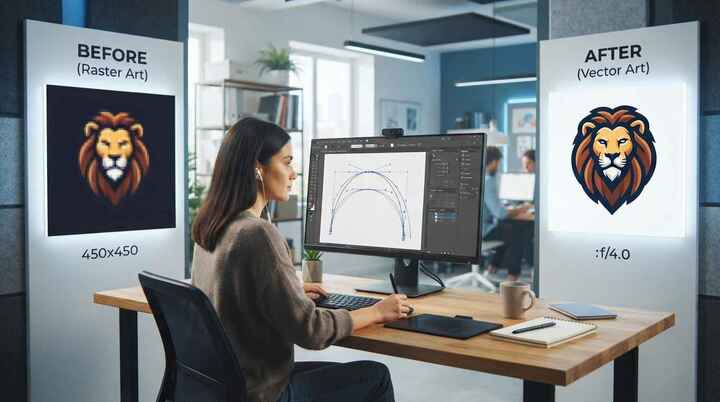
Raster images are widely used for websites, social media, product images, and digital marketing. However, when a raster image needs to be enlarged for printing, embroidery, signage, packaging, or branding, quality can become a major concern. Pixelation, blurry edges, and loss of detail can make an otherwise useful design difficult to work with.
This is where professional raster to vector art becomes useful. Raster-to-vector conversion changes a pixel-based image into a scalable vector graphic that can be resized without the same type of quality loss. Professional conversion also focuses on accurate shapes, clean paths, balanced curves, and appropriate colors so the final artwork can be used for different production requirements.
What Is Raster to Vector Conversion?
Raster to vector conversion is the process of recreating a pixel-based image as a vector graphic.
Raster files such as JPG, PNG, BMP, and GIF are made from individual pixels. When these images are enlarged beyond their original resolution, the pixels can become visible, causing the artwork to appear blurry or jagged.
Vector artwork works differently. It uses mathematical paths, lines, curves, shapes, and points to define the design. Because the artwork is based on paths rather than fixed pixels, it can be resized to different dimensions while maintaining clean edges.
Professional raster to vector conversion is not simply a matter of changing one file format into another. In many cases, the artwork needs to be carefully redrawn so its visual structure is accurately represented in vector form.
Why Do Businesses Need Professional Raster to Vector Art?
Businesses often have important artwork stored only as low-resolution raster files. A company logo, for example, may exist as a small JPG that looks acceptable on a website but becomes unclear when used on a large sign or printed material.
Professional vector conversion can provide a cleaner version of the artwork that is suitable for different applications.
Common reasons for converting raster artwork to vector include:
- Creating scalable business logos
- Preparing artwork for large-format printing
- Improving graphics for packaging
- Preparing designs for screen printing
- Creating artwork for signage
- Producing promotional materials
- Preparing graphics for embroidery or other production processes
The goal is to create artwork that can be adapted to different sizes and production requirements without repeatedly rebuilding the design.
How Professional Raster to Vector Art Works
The conversion process can vary depending on the artwork, but professional vectorization generally involves several important stages.
1. Reviewing the Original Raster Image
The first step is to examine the source image carefully. The designer considers its resolution, colors, shapes, typography, fine details, shadows, and overall structure.
A simple logo with solid colors may be relatively straightforward to recreate. A photograph or highly detailed illustration can require considerably more manual work.
The quality of the source image also affects the conversion process. A clear high-resolution image usually provides more useful information than a heavily compressed or blurry image.
2. Identifying Shapes and Design Elements
The artwork is separated into its main visual components. These may include circles, rectangles, custom shapes, letters, lines, borders, and other design elements.
Professional vectorization requires the designer to understand how these components relate to one another instead of simply tracing every visible pixel.
This helps produce cleaner and more manageable vector artwork.
3. Creating Vector Paths
Once the main elements have been identified, vector paths are created around them.
Curves and lines are carefully adjusted using vector editing software. The objective is to create smooth outlines without unnecessary anchor points or irregular shapes.
Poor tracing can produce excessive points, uneven curves, and awkward corners. Professional manual adjustment helps create a cleaner result.
4. Recreating Colors
Color reproduction is another important part of raster to vector conversion.
The designer identifies the colors used in the original artwork and recreates them using suitable vector color settings. Depending on the intended application, the final artwork may need to use RGB, CMYK, Pantone, or another color system.
For commercial printing, choosing the appropriate color mode can help reduce unexpected color differences between digital artwork and the printed result.
5. Rebuilding Typography
Text can require special attention during vectorization.
If the original image contains a company name, slogan, or other typography, the designer may need to identify the font or recreate the lettering as vector shapes.
This is especially important for logos because even small differences in letter proportions can change the appearance of the brand identity.
6. Cleaning and Refining the Artwork
After the basic vector artwork has been created, the design is reviewed for imperfections.
Unnecessary anchor points may be removed, curves may be corrected, gaps can be fixed, and proportions can be adjusted. The designer may also inspect overlapping shapes and alignment.
This cleanup stage can make the artwork easier to edit and more reliable for future production.
7. Testing the Final Vector File
The final artwork should be checked at different sizes and, when necessary, in the production environment where it will be used.
For example, artwork intended for large-format printing should be reviewed at an appropriate scale. A logo intended for embroidery may require additional adjustments because embroidery has different production requirements from digital graphics.
Testing helps identify problems before the artwork reaches the final production stage.
Manual vs. Automatic Raster to Vector Conversion
Some software can automatically trace raster images and generate vector paths. Automatic tracing can be useful for simple artwork, especially when the image contains clear shapes and limited colors.
However, automatic tracing can also create unnecessary anchor points, rough curves, incorrect shapes, and other imperfections.
Professional raster to vector services often combine automated tools with manual editing. Software can speed up parts of the process, while human review helps correct details that automated tracing may not interpret accurately.
The best approach depends on the complexity and intended use of the artwork.
What Makes a Professional Vector Conversion Different?
A professional conversion focuses on more than producing a vector file extension.
The quality of the paths, curves, proportions, colors, typography, and overall structure all matter. A file may technically be a vector file but still contain poorly created paths that make editing and production difficult.
Professional vector artwork should generally be:
- Clean and accurately traced
- Easy to edit
- Properly structured
- Scalable
- Suitable for its intended production method
- Consistent with the original artwork
These factors can make a significant difference when the same design needs to be used across multiple marketing and production materials.
Benefits of Professional Raster to Vector Art
Scalable Artwork
One of the primary benefits of vector graphics is scalability. A vector logo can be used on a small business card or enlarged for a large sign while maintaining sharp outlines.
Cleaner Edges
Professional vectorization creates defined paths and curves instead of relying on visible pixels. This can improve the appearance of logos, icons, illustrations, and other graphic elements.
Easier Editing
Vector artwork can usually be edited more easily than a flattened raster image. Individual shapes, colors, and other elements can be modified without rebuilding the entire design.
Flexible Production
A properly prepared vector file can support a variety of design and production applications. This can make it useful for printing, branding, packaging, signage, apparel graphics, and other projects.
Better Brand Asset Management
Businesses often need multiple versions of their logos and graphics. Having clean vector artwork can provide a reliable master file from which different sizes and variations can be prepared.
Raster to Vector Conversion for Printing
Printing is one of the most common reasons businesses convert raster artwork to vector.
Small raster images may look acceptable on a computer screen but become noticeably pixelated when enlarged for posters, banners, signs, packaging, or other printed materials.
Vector artwork can provide clean outlines at different sizes. However, vector conversion alone does not guarantee perfect printing. Factors such as color mode, printer capabilities, material, resolution of embedded images, and production settings can also affect the final result.
For this reason, the vector file should be prepared according to the requirements of the specific printing process.
Raster to Vector for Logos
Logo conversion is another common application.
Many businesses receive logos in JPG or PNG format because these formats are convenient for websites and digital communication. However, a brand may eventually need its logo for signage, uniforms, promotional products, packaging, vehicle graphics, or other large-scale applications.
A professionally recreated vector logo provides a more flexible master version of the design.
The conversion should preserve important brand characteristics such as proportions, typography, colors, spacing, and recognizable design elements.
Raster to Vector for Embroidery and Apparel
Vector artwork can also be useful when preparing graphics for apparel production. However, a vector file is not automatically an embroidery-ready file.
Embroidery requires a separate digitizing process in which the artwork is converted into stitch information for an embroidery machine.
A clean vector version can provide a useful source for this process because shapes, borders, and design elements are clearly defined. The digitizer can then determine appropriate stitch types, densities, underlay, thread colors, and other embroidery settings.
Choosing a Professional Raster to Vector Service
When selecting a vector conversion service, businesses should consider the quality of previous work, file formats provided, turnaround expectations, revision policies, and the designer's experience with different types of artwork.
It is also useful to provide the original artwork along with information about how the final vector will be used.
For example, artwork intended for screen printing may have different preparation requirements from artwork intended for signage or embroidery.
Clear communication about the final application can help the designer prepare the artwork appropriately.
Common Raster to Vector File Formats
Several vector formats are commonly used for professional design workflows.
AI: Adobe Illustrator's native format is widely used for editable vector artwork.
EPS: EPS is commonly used for logos, printing, and professional design workflows.
SVG: SVG is widely used for websites, digital graphics, and applications that support scalable web graphics.
PDF: PDF can preserve vector artwork and is frequently used for sharing and printing, although the editability depends on how the file was created.
The best format depends on the software and production requirements of the project.
Common Mistakes in Raster to Vector Conversion
Not every vector conversion produces professional results. Some common problems include tracing too many unnecessary points, creating uneven curves, changing the original proportions, using incorrect colors, and failing to inspect small details.
Another mistake is relying completely on automatic tracing without reviewing the generated paths.
A professional workflow includes both technical conversion and visual quality control. The final artwork should be checked against the original design before delivery.
How to Prepare Your Artwork for Vector Conversion
Providing the best available source file can make the process easier. If possible, provide a high-resolution version of the original artwork.
It is also helpful to communicate:
- The intended final size
- Where the artwork will be used
- Required file formats
- Required color mode
- Any important brand guidelines
- Whether the artwork needs to remain fully editable
If the original file is very small or damaged, a professional designer may need to make design decisions while recreating unclear areas.
Professional Raster to Vector Art for Better Artwork
Professional raster to vector conversion can turn a limited pixel-based image into a flexible vector asset suitable for different applications. The process involves more than selecting a tracing option. It requires careful examination, accurate path creation, color management, typography handling, cleanup, and final quality checks.
For businesses that rely on logos, illustrations, product graphics, or promotional artwork, maintaining clean vector versions can simplify future design and production work.
When the conversion is performed with attention to the original design and the intended application, the resulting artwork can provide a more reliable foundation for printing, branding, signage, apparel, packaging, and other creative projects.
Conclusion
Professional raster to vector art helps businesses convert pixel-based graphics into scalable and editable artwork. A carefully recreated vector file can provide cleaner paths, flexible sizing, easier editing, and broader production possibilities.
For businesses that need accurate and production-ready vector artwork, iDigitize can help transform raster designs into professionally prepared vector graphics based on the project's requirements.
FAQs
Q1. What is raster to vector conversion?
Raster to vector conversion is the process of recreating a pixel-based image as vector artwork using paths, shapes, lines, and curves.
Q2. Why should I convert a JPG logo to vector?
A JPG logo can become blurry when enlarged. A vector version can be resized while maintaining clean outlines and can also be easier to edit.
Q3. Can every raster image be converted to vector?
Most raster images can be recreated as vector artwork, but the complexity and amount of manual work depend on the image's quality and design details.
Q4. What is the best file format for vector artwork?
AI, EPS, SVG, and PDF are common vector formats. The appropriate format depends on the software and intended use.
Q5. Is raster to vector conversion the same as embroidery digitizing?
No. Raster to vector conversion creates vector artwork, while embroidery digitizing converts artwork into stitch information that an embroidery machine can read.
Q6. Can vector artwork be used for large-format printing?
Yes. Vector artwork is commonly used for large-format graphics because vector paths can be scaled to large dimensions without the same pixelation associated with raster images.
Q7. How long does professional raster to vector conversion take?
The turnaround time depends on the complexity of the artwork, number of colors, level of detail, and required output formats. Simple logos generally require less work than detailed illustrations.
 Venues